REAL AI COUNTRY SPAWNS ADD-ON for Jazzycat v21.8.6.B ETS2
UPDATE:
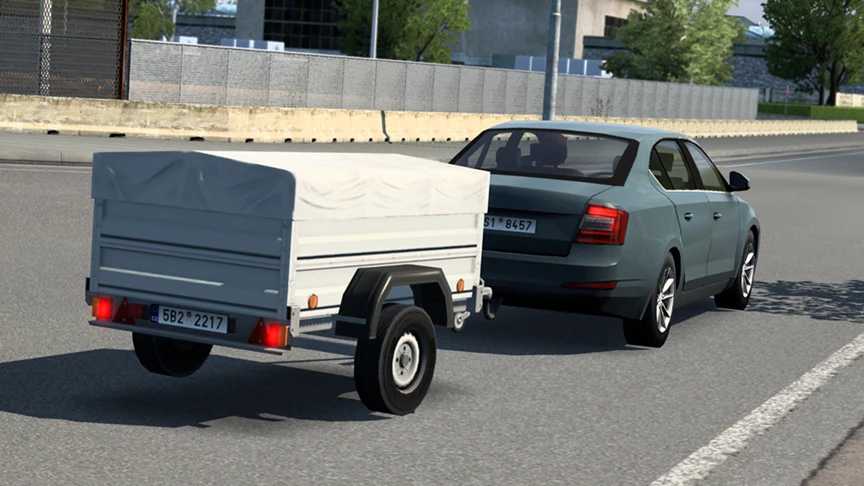
This internal update introduces a custom car trailer, more adjusted vehicles, and corrected traffic vehicles:
– Added a unique car trailer created from an SCS map prop.
– Vehicles restored and configured to spawn in traffic, with LHD interiors for the Bentley Bentayga and Land Rover Discovery 3.
– Vehicle adjustments include: SCS Kia Ceed SW (now matches the hatchback in size), SCS Skoda Octavia II (wider, longer, and adds a 3rd brake light), BMW 5 E39 Touring (size corrections), Ford Galaxy (size adjustments), and Ford Kuga ’13 (size adjustments).
– Fixed spawns in Kazakhstan.
This add-on establishes **REAL SPAWNS BY COUNTRY** based on car availability in each region. Customized settings for each country ensure that spawning reflects real traffic patterns and vehicle popularity. Wealth considerations mean fewer luxury cars in less affluent areas like Romania or Macedonia. The development was informed by sales data and observational studies over several years, originally for personal use but now shared publicly.
The add-on also addresses car spawning in left-hand drive countries (like the UK and Ireland) by prohibiting models without appropriate configurations. An exception exists for vans with UK skins to maintain availability on British roads.
All SCS countries have been set for spawns, with added support for various map mods including: Promods, Promods Middle-East, Promods Great Steppe, Road to Asia, Road To Africa (by Terramaps), Java Road Revolution (Indonesia), Maghreb map mod (North Africa), Heart of Africa, and Horn of Africa.
This add-on encompasses numerous fixes and enhancements:
Wheel adjustments, realistic color options, a custom car trailer, repairs to outdated vehicle models, texture enhancements, etc. For comprehensive details, please refer to my thread on the SCS forum!
This version is solely compatible with Jazzycat’s AI traffic pack v21.8.6 for ETS2 version 1.54.
Make sure to download Jazzycat’s AI traffic pack for compatibility! Position my add-on **ABOVE** Jazzycat’s AI pack in the mod manager!
Credits: Egon, Jazzycat, SCS
How to install ETS2 mods or ATS Mods
Installing mods in Euro Truck Simulator 2 is straightforward. Simply download the mod, extract the files into: “My Documents\Euro Truck Simulator 2\mod” folder, or for ATS, use: “My Documents\American Truck Simulator\mod” folder. Use tools like WinRAR or 7zip for extraction. Finally, activate the mods you wish to utilize.