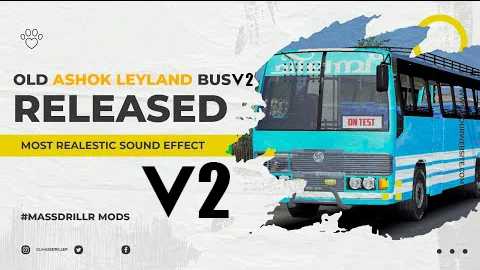
Classic Leyland Bus Mod 1.28-1.36 ETS2
The **Classic Leyland Bus Mod** for *Euro Truck Simulator 2* (ETS2) adds a vintage Leyland bus to the game, allowing players to drive a nostalgic British vehicle in their digital environment. This modification is compatible with ETS2 versions 1.28 to 1.36, making it accessible to users of these specific versions.
Notable Features:
– **Vehicle Model:** Experience a meticulously crafted Leyland bus that embodies the charm of traditional British bus design, featuring authentic interior and exterior elements.
– **Realistic Sound:** The bus includes sound effects that accurately represent the engine sounds from its era, providing an immersive experience for players.
– **Customization Options:** Similar to many ETS2 mods, this bus allows players to customize various aspects, including paint designs and accessories, to personalize their in-game vehicle.
– **Unique Driving Experience:** Navigating the Old Leyland bus offers a distinct driving sensation compared to typical trucks in ETS2, featuring its own unique handling characteristics.
– **Version Compatibility:** Designed specifically for ETS2 versions 1.28 to 1.36, this mod ensures smooth performance and integration with these game versions.
Installation Instructions:
To install the Classic Leyland Bus Mod, players should download the mod files and place them in the “mod” folder located in the ETS2 directory. Then, they can activate it through the game’s mod manager before starting a new game or resuming an existing one.
This mod delivers a nostalgic experience for bus enthusiasts and offers a refreshing alternative to the usual heavy-duty trucks found in *Euro Truck Simulator 2*.
Credits: Manav Kummil Massdriller Youtube
Installing ETS2 or ATS Mods
Adding mods to Euro Truck Simulator 2 is straightforward. Simply download the desired mod from this site and copy/unzip the files into the “My Documents\Euro Truck Simulator 2\mod” folder. If you’re playing ATS, place the mods in “My Documents\American Truck Simulator\mod” folder instead. You can use WinRAR or 7zip to unzip files. After that, be sure to activate the mods you wish to use.