REAL AI COUNTRY SPAWNS ADD-ON for Jazzycat v21.8.9 ETS2
UPDATE DETAILS:
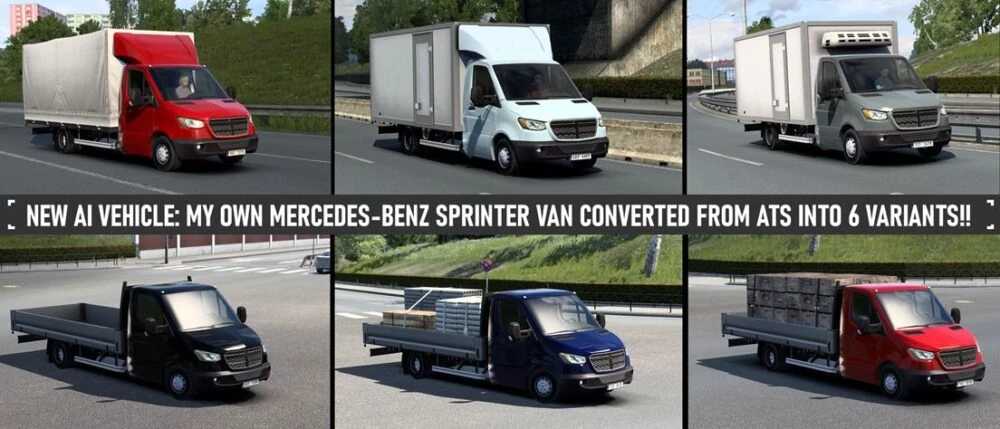
– This version introduces something truly exciting! – I’ve converted the Mercedes-Benz Sprinter from ATS, transforming the RV into six different variants of box/flatbed vans!
– Included an open cabriolet option for Jazzycat’s Peugeot 206 CC.
– Newly added spawns for Gibraltar.
– Corrected several minor errors that arose in version 1.56.
– Additional improvements and fixes.
This add-on assigns cars to their REAL COUNTRY-BASED SPAWNS. Each country has a custom setup for vehicle spawning, reflecting real traffic patterns and the popularity of different car brands. Spawns are also influenced by the country’s wealth.
It ensures that vehicles in left-drive countries do not have models that are not applicable to them, with a few exceptions for vans equipped with UK skins, preventing them from vanishing from UK roads.
The countries included in this add-on span all SCS countries as well as map mods: Promods, Promods Middle-East, Promods Great Steppe, Road to Asia, and Road To Africa (by Terramaps), Java Road Revolution map (Indonesia), Maghreb map mod (Northeast Africa), Heart of Africa, and Horn of Africa maps.
Furthermore, this add-on features numerous corrections and enhancements:
Changes to wheels, accurate colors and a generic color palette, my unique car trailer, variety in car trailers, the removal of inferior car models from traffic, texture improvements, and more. For further details, please refer to my thread on the SCS forum!
This version is exclusively compatible with Jazzycat’s AI traffic pack v21.8.9 for ETS2 version 1.56.
Ensure you download Jazzycat’s AI traffic pack for the add-on to function! Place my add-on ABOVE Jazzycat’s AI pack in the mod manager!
Enjoy a more realistic traffic experience.
Credits: Egon, Jazzycat, SCS, SGD
Installation Guide for ETS2 or ATS Mods
Installing mods in Euro Truck Simulator 2 is straightforward. Simply download the mod from here, then copy/unzip the files into the “My Documents\Euro Truck Simulator 2\mod” folder. For American Truck Simulator, place the mods in the “My Documents\American Truck Simulator\mod” folder. You can use tools like WinRAR or 7zip for unzipping. After this, activate the mods you wish to use.