
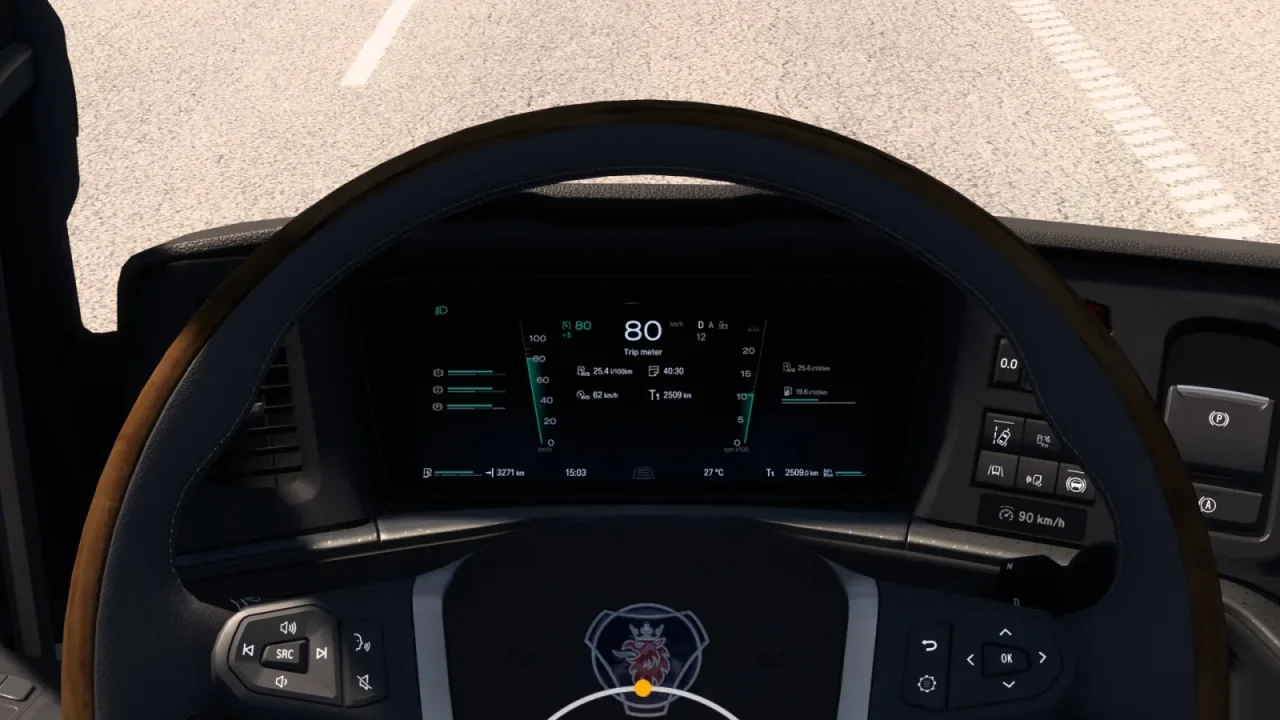
Image: supplied by the mod author
Scania Smart Dash Improved Dashboard
Extra gauges and infotainment information for Scania Smart Dash interiors. Includes high-roof R/S variants; UK right-hand-drive is not supported.
- Author
- Knights Gaming & AMYLECH
- Works with
- 1.61
- DLC needed
- No specific DLC listed by the author
- Price
- Free
- Link checked
- 25 October 2026
- Listed by
- The mod's author, reviewed by us
This opens the mod's official page. We never re-upload mods, so you always get the author's latest, untouched version.
Does it work for you on ETS2 1.61?
About this mod
KnightRider (Knights Gaming) and AMYLECH add more information to Scania Smart Dash interiors: an odometer, fuel quantity, axle indicators, oil temperature, turbo pressure and additional infotainment details.
UK right-hand-drive interiors are not supported. Enhanced interior variants are for R/S high-roof cabs; choose one marked Improved Dashboard and match it to the truck’s axle configuration. The author’s version 2.0 notes add support for ETS2 1.61.
Assign Dashboard Display Mode, Infotainment Display Mode and Navigation Zoom Mode controls to move through the information pages.
Choose an Improved Dashboard interior for full axle-indicator functionality.
Use a supported left-hand-drive Smart Dash interior.
Features
- Additional gauges and axle information
- ETA, speed-limit and rest-time information
- Interior variants for supported high-roof Scania R/S models
How to install Scania Smart Dash Improved Dashboard
- Open the mod's Steam Workshop page (sign in to Steam if asked) and press Subscribe. Steam downloads it for you.
- Start Euro Truck Simulator 2. On the profile screen, open the Mod Manager.
- Find Scania Smart Dash Improved Dashboard in the list and move it to Active mods, then press Confirm changes.
Helpful guides
Link broken, or the mod has a newer version? Tell us and we'll check it.


