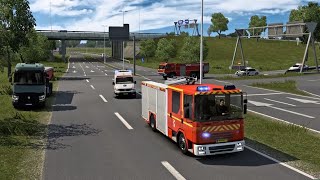
Picture by lavrik, from the mod's Steam Workshop page.
Actual Speed Limits
Raises or lowers national speed limits for trucks, buses and AI cars where traffic rules allow, so routes and schedules feel closer to real roads.
- Author
- lavrik
- Game version
- 1.62as listed by the author (see the official page)
- Players
- Needs
- Nothing extra, the base game is enough
- Price
- Free
- Added to site
- 27 November 2026
Hear about more like this? We'll show new ones in Your week on My mods.
Does it work for you on ETS2 1.62?
About this mod
Euro Truck Simulator 2 keeps some country speed limits for trucks and buses behind real-world rules. This mod updates those limits for trucks, buses and AI cars, so navigation, speed enforcement and traffic behaviour follow the law more closely.
It only changes maximum speeds where higher or lower limits apply to a given road class and vehicle type. Local signs, urban zones and road restrictions still apply, and it doesn't set one flat speed everywhere. Bus timetables and truck delivery deadlines are recalculated by the game using the new limits.
It works with the base game's countries and is said to be compatible with DLCs and map mods such as ProMods, though only the default in-game countries are changed. The author does not name a game version. Last updated on Steam on 27 November 2026.
Features
- Adjusts speed limits for trucks, buses and AI cars in ten default countries
- Changes apply only where the law allows a different maximum speed
- Keeps local signs, urban zones and road restrictions in force
- Bus schedules and delivery times are recalculated automatically
- No DLCs required
How to install Actual Speed Limits
- Open the mod's Steam Workshop page (sign in to Steam if asked) and press Subscribe. Steam downloads it for you.
- Start Euro Truck Simulator 2. On the profile screen, open the Mod Manager.
- Find Actual Speed Limits in the list and move it to Active mods, then press Confirm changes.
Load order: Place above all other mods.
Helpful guides
 Best ETS2 Mods for 1.62 (2026): Hand-Picked by JobMods worth installing, grouped by job, with version, DLC needs and load order
 Best ETS2 Realism Mods for 1.62 & 1.61: Sound, Physics, Traffic and WeatherSound, physics, traffic, weather and lights: what to install, what clashes, in what order
 ETS2 Car Mods: How They Work and How to Avoid Bad DownloadsHow drivable cars work in ETS2, ripped models, fake sites and safe places to lookInstalling from Steam WorkshopSubscribing, switching the mod on, and removing it safelyLoad order explainedWhich mod wins when two change the same thingIf the game crashesHow to find the mod that causes it in a few restarts
Link broken, or the mod has a newer version? Tell us and we'll check it.