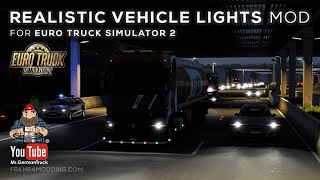

Picture by Frkn64, from the mod's Steam Workshop page.
Realistic Graphics Mod Lite
Free sky and lighting overhaul with 15 custom skies, three fair-weather profiles and softer sunrises and golden sunsets for more immersive drives.
- Author
- Frkn64
- Game version
- 1.62 1.61as listed by the author (see the official page)
- Mod version
- 6.0
- Players
- Needs
- Nothing extra, the base game is enough
- Price
- Free
- Link checked
- 22 November 2026 (the download page opens; not a test of the mod)
Hear about more like this? We'll show new ones in Your week on My mods.
Does it work for you on ETS2 1.62?
Screenshots (6)


Screenshots by Frkn64, from the mod's Steam Workshop page. Click a picture to see it full size.
About this mod
Realistic Graphics Mod Lite is a free visual update that reworks the skies, environmental lighting and atmospheric effects in Euro Truck Simulator 2. It is the first step of a series that dates back to 2016.
The Lite version adds 15 custom sky textures with clear skies and natural cloud formations, plus three fair-weather profiles. Exposure and fog are reworked, and cloud shadows are improved. The author states it supports game versions 1.61.x and 1.62.x.
A larger paid Full Version is sold separately through Modsy. It adds more skies, rain and wet road effects, water textures and extra dust and spray. This page covers the free Lite version only.
Features
- 15 custom sky textures with clear skies and cloud formations
- Three distinct fair-weather profiles
- Softer sunrises and golden sunsets
- Reworked environmental lighting and exposure
- Improved fog and cloud shadows
How to install Realistic Graphics Mod Lite
- Open the mod's Steam Workshop page (sign in to Steam if asked) and press Subscribe. Steam downloads it for you.
- Start Euro Truck Simulator 2. On the profile screen, open the Mod Manager.
- Find Realistic Graphics Mod Lite in the list and move it to Active mods, then press Confirm changes.
Helpful guides
 Best ETS2 Realism Mods for 1.62 & 1.61: Sound, Physics, Traffic and WeatherSound, physics, traffic, weather and lights: what to install, what clashes, in what orderInstalling from Steam WorkshopSubscribing, switching the mod on, and removing it safelyIf the game crashesHow to find the mod that causes it in a few restarts
Link broken, or the mod has a newer version? Tell us and we'll check it.