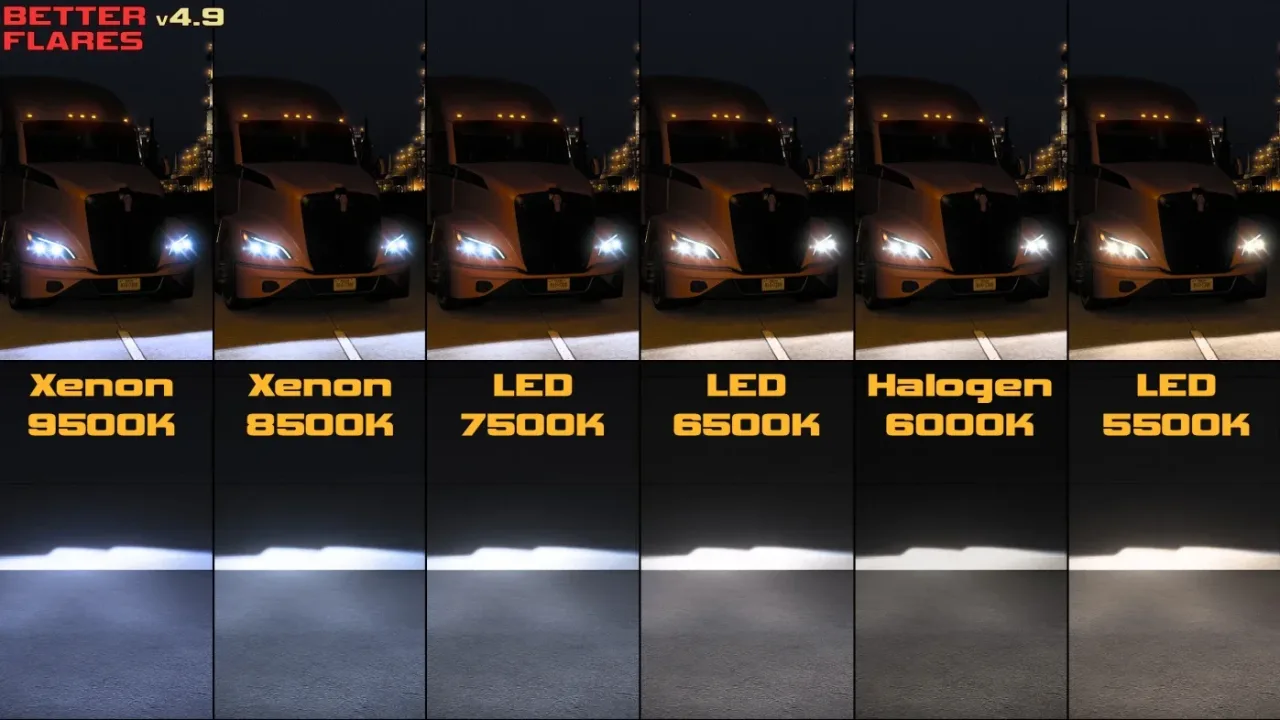
Video by Mr GermanTruck (version 4.6.5). It plays from YouTube when you press play.
Better Flares
Reworked light flares, realistic headlight beams in 12 lamp colours and softer street lamps. Version 4.9.1 for ETS2 1.61, updated 19 October 2026.
- Author
- Avelium
- Game version
- 1.61as listed by the author (see the official page)
- Players
- Needs
- Nothing extra, the base game is enough
- Clashes with
- DBM Headlights Plus, Realistic Vehicle Lights Mod, Better Flares ETS2 v4.9.1 use one unless the authors document a compatible combination or connector; changing load order alone may not resolve this
- Price
- Free
- Link checked
- 19 October 2026 (the download page opens; not a test of the mod)
Hear about more like this? We'll show new ones in Your week on My mods.
Does it work for you on ETS2 1.61?
Screenshots (3)


Stills from the video above. Click a picture to see it full size.
About this mod
Better Flares changes how lights look at night. The glare around headlights, tail lights and indicators is redrawn so it looks like a real lamp seen through a windscreen instead of a big white blob. Optional add-ons go further: headlight beams with their own patterns and colours, more varied lights on AI traffic, and dimmer, more natural street lighting in towns.
Avelium first made the mod years ago, then brought it back in 2024 with version 4.0 and has updated it after every game patch since. Version 4.9.1 was released on 19 October 2026 for ETS2 1.61. Downloads are linked from the author's forum thread, which also has the changelog and older versions for previous game updates.
Features
- Completely reworked light flares on every vehicle
- Headlights add-on: 6 beam patterns and 12 lamp colours, for 184 trucks and 4 cars
- Traffic add-on: 10 headlight colours and 2 tail-light shades on AI vehicles
- City Lights add-on: dimmer, more realistic street lamps, with an optional fog version
- Free, with older versions kept for previous game versions
How to install Better Flares
- Download the mod from SCS Software forum.
- Follow the author's installation instructions. Keep ready-to-use
.scsor.zipmod packages intact; extract archives containing separate mod packages as directed. - Move the ready-to-use
.scsor.zipmod package(s) intoDocuments\Euro Truck Simulator 2\mod. Create themodfolder if it isn't there. - Start the game, open the Mod Manager on the profile screen, move Better Flares to Active mods and press Confirm changes.
Load order: The author's rule: the Traffic add-on goes above Sound Fixes Pack, which it needs. Other sound mods (engines, radio) can go anywhere. The full order is in a picture in the author's first post.
Notes for this mod
- Download from the author's forum thread. There are two files: the base mod with the Headlights and City Lights add-ons, and the separate Traffic add-on.
- The Headlights add-on has two parts, Headlights.1 (the beam pattern) and Headlights.2 (the lamp colour). Enable both, or the headlights won't work.
- The Traffic add-on needs Sound Fixes Pack. Without it, AI traffic won't spawn.
- If you use a traffic pack (Jazzycat, TrafficManiac and similar), get the compatibility patches by gl00ria linked in the thread.
Known conflicts
- Other mods that change headlights or light flares, such as Realistic Vehicle Lights, may overlap with the Headlights add-on. If lights look wrong, keep only one of them.
Part of this mod set: Night driving & lights set. Each set has the whole load order worked out.
Helpful guides
 Best ETS2 Realism Mods for 1.61: Sound, Physics, Traffic and WeatherSound, physics, traffic, weather and lights: what to install, what clashes, in what orderInstalling a downloaded modWhere the mod folder is and what to do with .scs, .zip and .7z filesLoad order explainedWhich mod wins when two change the same thingIf the game crashesHow to find the mod that causes it in a few restarts
Link broken, or the mod has a newer version? Tell us and we'll check it.